Skip to content
Introduction: Choosing the Best Booking WordPress Plugin
If your business depends on appointments, reservations, or scheduled services, a reliable booking system is no longer optional—it’s essential. Whether you run a salon, consulting practice, clinic, agency, or workshop, customers expect to book online quickly and without friction. That’s where WordPress booking plugins come in.
The WordPress ecosystem offers a wide range of booking solutions, each designed with different priorities in mind. Some plugins focus on simplicity and speed, making them ideal for freelancers or small service businesses. Others are built for larger teams, multi-location operations, or businesses that need advanced automation, analytics, and payment integrations.
Plugins like Bookly and Amelia are known for their polished interfaces and strong feature sets, making them popular among agencies and growing businesses. LatePoint stands out for its lightweight design and fast setup, offering a modern booking experience with minimal configuration. Salon Booking System targets service industries like salons, clinics, and workshops with specialized scheduling tools. Meanwhile, Vik Booking is often favored in the hospitality sector, particularly for property and accommodation reservations.
Each of these plugins approaches booking management differently—some prioritize ease of use, others flexibility, and others deep customization or industry-specific features. The right choice depends on your business model, technical requirements, and growth plans.
So choosing the best booking WordPress plugin for the needs of your business is critical. In this article, we’ll explore some of the best booking WordPress plugins available today, comparing their strengths, limitations, and ideal use cases so you can find the solution that fits your needs
Amelia

Amelia is one of the most comprehensive WordPress booking plugins available today. Built with a modern, mobile-first interface and a strong focus on automation, it enables businesses to manage appointments, events, employees, and payments from a single dashboard.
Designed for service-based businesses, Amelia replaces manual scheduling systems—like phone bookings, spreadsheets, and email confirmations—with a fully automated workflow. Customers can book appointments 24/7, while business owners gain complete control over schedules, staff, and revenue.
Amelia is available in two main versions:
- Amelia Lite (free): Essential booking features for small businesses and beginners
- Amelia Premium: Advanced automation, integrations, and customization for growing or enterprise-level operations
What Makes Amelia Stand Out
Amelia is built around three core principles:
- Automation: Reduce manual booking tasks through notifications, calendar sync, and automated scheduling.
- User experience: A clean, intuitive interface for both administrators and
- Scalability: Works for solo professionals, small teams, and multi-location
Its combination of ease of use and advanced functionality makes it a popular choice among salons, clinics, consultants, and event organizers.
Core Booking Capabilities
At its foundation, Amelia provides a complete booking system that supports:
- Individual and group appointments
- Event bookings
- Multiple employees and locations
- Service categories and extras
- Automated notifications
- Business performance analytics
Customers can book directly from the website through a step-by-step interface or a catalog-style service list.
Amelia Lite: Free Version Features
The free version of Amelia includes a surprisingly robust set of features suitable for small businesses or those just starting with online booking.
Booking Forms and Shortcodes
- Appointment booking forms with step-by-step or catalog views
- Event booking forms with event list display
- No coding required to embed booking forms
Calendar and Scheduling
- Back-end calendar overview for appointments and events
- Employee working hours configuration
- Automatic prevention of double bookings
- Customer time-zone-based booking slots
Services and Events
- Creation of services and service categories
- Multi-day event creation
- Event capacity and status management
Dashboard and Analytics
- KPI dashboard showing:
- Revenue
- Load percentage
- Approved appointments
- Daily occupancy
- Quick view of upcoming bookings
Notifications and Communication
- Email and SMS booking confirmations
- Customizable notification templates
- Redirect URL after booking
Payments (Free with Square)
- Accept online payments via Square
- Deposit collection
- Refund management
- Secure payment processing
Customization and Builder Integration
- Works with Elementor, Divi, and Gutenberg
- On-page or pop-up booking forms
- Branding customization options
- 20+ language support
- Customer import via CSV
Amelia Premium: Advanced Features
Premium plans unlock enterprise-level functionality designed for larger or more complex booking operations.
Advanced Appointment Management
- Custom service durations with different prices
- Recurring appointments
- Group bookings and extras
- Buffer times before and after appointments
- Shared or single resources to limit bookings
Custom Booking Experience
- Custom fields (text, address, file upload, )
- Address fields linked to Google Maps
- Advanced form customization (colors, field order, required fields)
- Multiple selections in booking shortcodes
Automation and Notifications
- Scheduled email and SMS reminders
- Custom notification templates
- Multiple reminders or follow-ups
- WhatsApp reminders and messages
- No-show customer tagging
Integrations
- Google Calendar
- Outlook Calendar
- Zoom
- Google Meet
- Lesson Space
- Facebook Pixel
- Google Analytics
- Webhooks for custom integrations
- REST API for developers
Payments and Financial Features
- PayPal, Stripe, WooCommerce, Mollie, Razorpay
- Square (also in Lite version)
- Pay-via-link option
- Deposit payments
- Refund processing
- Tax automation
Employees, Locations, and Clients
- Employee database with:
- Working hours
- Capacity
- Service pricing
- Days off and special days
- Multiple business locations
- Customer and employee management panels
Events and Packages
- Event tickets with multiple price tiers
- Minimum and maximum attendee limits
- Monthly event calendar view
- Service packages and bundles
- Discount coupons
Advanced Booking Tools
- Cart feature for multiple appointments in one transaction
- Show busy time slots
- Employee badges
- Custom resources for booking limits
Automation, Notifications, and Integrations
One of Amelia’s most valuable advantages is its automation ecosystem.
Automated Notifications
- Booking confirmations
- Appointment reminders
- Follow-ups and rescheduling alerts
- Email, SMS, and WhatsApp options
This helps reduce no-shows and improves communication.
Calendar Synchronization
Real-time synchronization with:
- Google Calendar
- Outlook Calendar
This ensures up-to-date schedules and prevents double bookings.
Recommended Use Cases
Amelia is ideal for:
- Beauty salons and spas
- Fitness studios
- Healthcare and wellness providers
- Consultants and coaches
- Repair and service businesses
- Event organizers
Small businesses can rely on the free version, while larger teams benefit from premium features.
Business Benefits of Using Amelia
Time and Cost Savings
Automation eliminates manual scheduling and reduces administrative workload.
Improved Professionalism
Customers can book instantly from any device, without phone calls or emails.
Better Organization
All appointments, employees, services, and payments are managed from a single dashboard.
Increased Control
Real-time analytics and KPIs provide insights into performance and revenue.
Summary of Key Takeaways
- Amelia is a comprehensive WordPress booking plugin for appointments and
- It supports multiple employees, locations, services, and payment
- The free version provides essential booking and payment
- Premium plans unlock advanced automation, integrations, and
- Suitable for a wide range of service-based
- Designed for both beginners and enterprise-level
Pros and Cons of Amelia
Pros
- Modern, intuitive, mobile-friendly interface
- Free version with essential booking and payment features
- Extensive automation and notification system
- Built-in KPIs and reporting dashboard
- Supports appointments, events, group bookings, and packages
- Wide range of integrations and payment gateways
- Highly customizable booking forms
- Suitable for multi-employee and multi-location businesses
Cons
- Advanced features require premium plans
- Not ideal for hotel or property-style booking systems
- Some complex checkout workflows may require WooCommerce
- Initial setup can be detailed for larger teams
Is Amelia a strong choice?
If you’re looking for a powerful, modern, and scalable booking solution for WordPress, Amelia is one of the strongest options available. It combines automation, flexibility, and ease of use in a single plugin, making it suitable for both small businesses and large service operations.
With its free version offering essential features and premium plans unlocking enterprise-level capabilities, Amelia provides an excellent price-to-feature ratio. For most service-based websites, it delivers everything needed to manage bookings efficiently and professionally.
Bookly

Another strong choice is Bookly. Bookly is a WordPress scheduling plugin that allows businesses to accept appointments online and automate the booking process. It is designed for service-based businesses such as:
- Coaches and consultants
- Salons and wellness providers
- Medical or therapy practices
- Fitness trainers
- Photographers and freelancers
- Educational services
The plugin works directly inside WordPress, allowing customers to book appointments without leaving your website.
Core Booking Experience
From the customer’s perspective, Bookly keeps the process simple and intuitive. A typical booking flow looks like this:
- Select a service or category
- Choose an available date and time
- Enter contact details
- Confirm the appointment
Once the booking is complete, the system automatically:
- Adds the appointment to your calendar
- Sends confirmation emails or SMS messages
- Notifies both the client and the service provider
This smooth, step-by-step process is exactly what most small businesses need.
Key Features of Bookly (Core Version)
Bookly’s core feature set focuses on simplicity, customization, and ease of use. Some of the main capabilities include:
Booking and Interface
- Fast online booking with intuitive forms
- Fully customizable booking form appearance without coding
- Unlimited booking forms across your website
- Responsive design for all devices
Administration and Management
- Comprehensive admin panel with an intuitive interface
- Monthly, weekly, and daily calendar views
- Manageable customer database
- Searchable, sortable, and filterable booking lists
Service Configuration
- Variable service durations (from 5 minutes to 7 days)
- Services grouped into categories
- Customizable availability and schedules
Notifications and Communication
- Customizable SMS and email notifications
- Automated SMS campaigns for marketing
- Appointment confirmations and reminders
Integrations and Compatibility
- WPML integration for multilingual websites
- Blocks for Elementor and Gutenberg page builders
These features alone are enough for many small businesses that just need a reliable scheduling system.
Bookly Pro: Advanced Features
For users who need more advanced functionality, the Bookly Pro add-on unlocks additional tools and integrations.
Staff and Service Management
- Unlimited staff members with individual schedules
- Unlimited services with advanced settings
- Staff profiles and personal calendars
Payments and E-commerce
- Secure online payments
- Payment gateways including Stripe, PayPal, Mollie, and others
- WooCommerce compatibility
Advanced Communication
- Additional email templates
- Automated reminders and follow-ups
- Birthday greetings and marketing messages
Integrations and Automation
- Google Calendar synchronization
- Zoom, Google Meet, and Jitsi integration
- Mailchimp integration (via add-on)
- iCalendar export
Data and Analytics
- Built-in analytics and reporting
- Import/export customer lists with booking data
Extended Customization
- Advanced form fields (address, birthday, )
- Time zone switcher
- Facebook login
- Dozens of add-ons for features like:
- Recurring appointments
- Coupons and deposits
- Waiting lists
- Group bookings
- Automatic invoicing
- Client accounts
This modular approach allows you to build a booking system that fits your exact needs.
Pros and Cons of Bookly
Pros
- Simple, clean, and intuitive booking experience
- Easy setup with no coding required
- Fully customizable booking forms
- Flexible service durations and categories
- Strong notification and reminder system
- Wide range of integrations and add-ons
- Suitable for many service-based businesses
Cons
- Many advanced features require the Pro version
- Add-ons can increase the total cost over time
- Free version has limitations (staff, services, payments)
- Default calendar design is somewhat basic
Summary
Bookly is a practical, flexible, and cost-effective booking plugin for WordPress. It focuses on simplicity while still offering powerful features through its Pro version and add-ons.
For businesses with straightforward booking needs, it provides everything required:
- A clean customer booking flow
- Customizable forms
- Automated notifications
- A simple admin interface
The one-time purchase model is especially attractive for small businesses, freelancers, and service providers who want to avoid recurring subscription fees.
If you’re looking for a booking plugin that balances simplicity, flexibility, and long-term affordability, Bookly is definitely worth considering.
Vik Booking
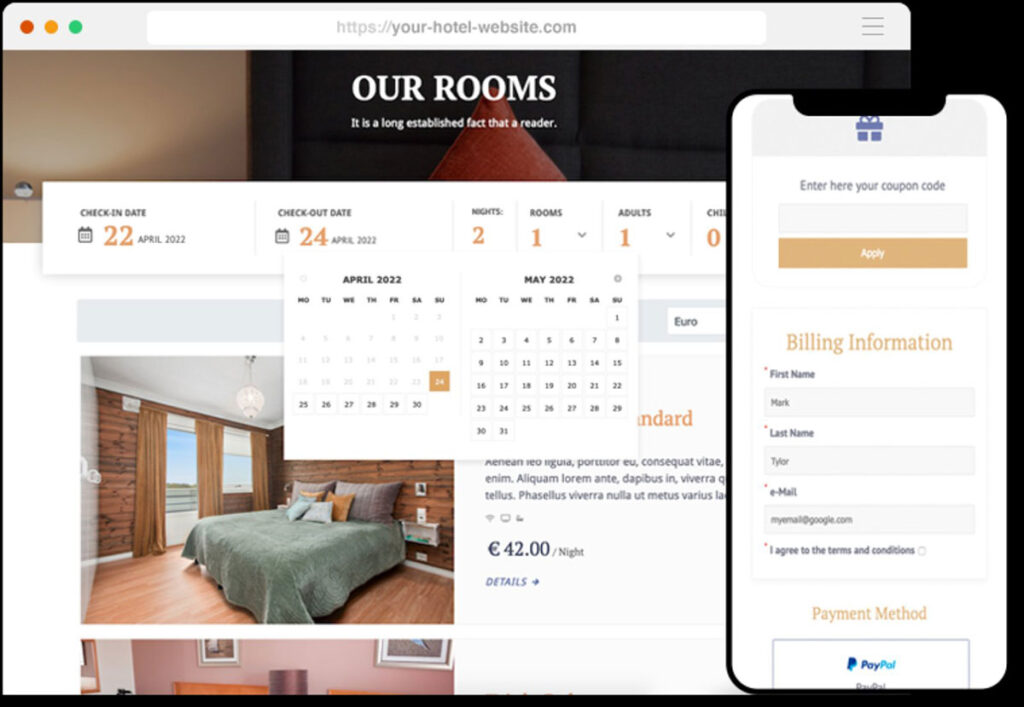
Vik Booking is widely recognized as one of the most comprehensive hotel booking plugins available for WordPress. Rather than functioning as a simple reservation form, it positions itself as a complete booking engine combined with property management system (PMS) features and channel distribution tools. This makes it suitable for a wide spectrum of accommodation businesses—from small vacation rentals to multi-room hotels that require advanced pricing logic, reporting, and operational workflows.
Core Booking Engine and Room Management
At its foundation, Vik Booking provides a robust reservation engine designed specifically for accommodation providers. The plugin allows administrators to create and manage rooms, room types, and sub-units, offering flexibility for properties with complex room structures or shared inventory.
The system supports custom rate plans, including refundable, flexible, and non-refundable options. This enables hoteliers to implement revenue-management strategies directly from their WordPress dashboard. Pricing can be configured according to multiple models, such as:
- Occupancy-based pricing
- Nightly rates
- Length-of-stay (LOS) pricing
- OBP (Occupancy-Based Pricing)
- Other custom pricing structures
To maintain control over inventory, Vik Booking includes availability calendars and a comprehensive occupancy overview. These tools help administrators monitor booking trends, identify gaps in occupancy, and adjust rates or restrictions accordingly.
The plugin also features a centralized bookings management interface, allowing staff to view, edit, and communicate with guests directly from the back end. This eliminates the need for separate booking management tools and simplifies day-to-day operations.
Backend Control and Operational Features
One of Vik Booking’s key strengths is its feature-rich backend environment. From this centralized dashboard, administrators can control rates, availability, reservations, and operational details.
The plugin also includes:
- Housekeeping tools, such as tableaux, festivities, and room-day notes, to track cleaning schedules and special events
- Permissions and ACL management, enabling role-based access control for different WordPress user roles
- Customer and sales channel management (Pro), including commission tracking
These features allow the plugin to function not just as a booking engine, but as a lightweight PMS integrated directly into WordPress.
Frontend Booking Experience and Customization
On the guest-facing side, Vik Booking offers a highly customizable booking flow. The plugin provides eight different frontend views, each accessible via dedicated shortcodes. This allows site owners to build custom booking pages that align with their website’s design and structure.
Key frontend features include:
- Customizable booking process
- Multiple layout options for search and availability displays
- Built-in multilingual support with translation functions
- Seamless integration into WordPress themes
This flexibility ensures that the reservation process remains visually consistent with the rest of the website, which is essential for user experience and conversion optimization.
Channel Distribution and Online Visibility
Vik Booking is developed by e4jConnect, a certified Channel Manager provider. As a result, the plugin is channel-manager compatible, allowing properties to synchronize inventory and rates across online travel agencies (OTAs) and booking platforms.
Additionally, Vik Booking is Google Hotel Ads certified for Free Booking Links, which helps properties appear in hotel search results and attract direct bookings without paying commissions to third-party platforms.
These integrations are particularly valuable for businesses looking to increase their online reach while maintaining control over direct reservations.
Advanced Pro Features
While the free version offers a solid foundation, the Pro version significantly expands the plugin’s capabilities. It introduces advanced pricing, automation, reporting, and operational tools that bring the system closer to a full PMS solution.
Pricing and Booking Logic
- Seasonal rates with a visual rates calendar
- One-click rate modifications
- Booking restrictions, including:
- Minimum and maximum length of stay
- Closed to arrival (CTA) and closed to departure (CTD)
- Forced arrival or departure days
Payments and Automation
- Support for over 60 custom payment gateways
- SMS gateways for automated notifications
- Custom cron jobs for automated tasks such as reminders or invoices
Customer and Revenue Management
- Customer management tools
- Sales channel and commission tracking
- Graphs and statistics for performance insights
Extra Services and Booking Adjustments
- Custom options, extra services, and additional fees
- Ability to add, remove, or switch rooms within existing bookings
Reporting and Compliance
- PMS reports with an extendable framework
- Electronic invoicing framework compliant with:
- Italy’s Agenzia delle Entrate
- Greece’s myDATA (ΑΑΔΕ)
Operational Tools
- Check-in, check-out, and no-show registration functions
These features position Vik Booking Pro as a comprehensive operational tool, not just a booking form.
Complete Feature Overview
Unique Core Features
- Custom rate plans (refundable, flexible, non-refundable)
- Rooms, room types, and sub-units management
- Availability calendars and occupancy overview
- Centralized bookings management
- Feature-rich backend
- Customizable frontend booking flow
- Eight frontend views via shortcodes
- Support for multiple pricing models (occupancy, nightly, LOS, OBP, )
- Housekeeping tools with tableaux and room-day notes
- Permissions and ACL management
- Multilingual support with built-in translations
- Channel manager compatibility (e4jConnect)
- Google Hotel Ads certification for Free Booking Links
Pro Version Highlights
- Seasonal rates and rate calendar
- Booking restrictions (min/max stay, CTA/CTD, forced days)
- 60+ payment gateway integrations
- SMS notification gateways
- Custom cron job scheduling
- Customer and sales channel management
- Graphs and statistics
- Extra services and custom fees
- Room changes within bookings
- PMS reports with extendable framework
- Electronic invoicing (Italy and Greece compliance)
- Check-in, check-out, and no-show functions
Pros of Vik Booking
1. All-in-one solution
Combines booking engine, PMS-style tools, and channel distribution capabilities.
2. Flexible pricing and restrictions
Supports multiple pricing models and advanced booking rules.
3. Highly customizable frontend
Eight views and shortcode-based layouts allow deep integration with any theme.
4. Strong operational features
Includes housekeeping tools, customer management, and check-in/out functions.
5. Channel manager and Google integration
Helps increase direct bookings and synchronize inventory across platforms.
Cons of Vik Booking
1. Steeper learning curve
The extensive feature set can feel complex for beginners or very small properties.
2. Premium cost for full functionality
Many advanced features are locked behind the Pro version.
3. Backend complexity
The interface is powerful but may appear dense compared to simpler booking plugins.
4. Setup time
Advanced pricing models and restrictions require careful configuration.
Pricing and Final Assessment
Vik Booking offers a free version with essential booking tools and a Pro version priced around $157.63. While the free edition is sufficient for basic reservations, most professional properties will benefit from upgrading to Pro to access seasonal pricing, automation, advanced reports, and PMS features.
Overall, Vik Booking is best suited for property owners who want a powerful, scalable, and fully integrated booking solution within WordPress. Its extensive feature set, channel
compatibility, and operational tools make it a strong choice for businesses seeking more than just a basic reservation plugin. It delivers the functionality of a booking engine, PMS, and distribution system in a single, cohesive platform.
LatePoint : A Lightweight, Fast, and Modern Booking Plugin for WordPress

LatePoint is a lightweight appointment booking plugin built for service-based businesses that want a modern interface, fast setup, and powerful automation. Instead of juggling emails, calls, and manual scheduling, LatePoint allows customers to book appointments directly from your WordPress website in just a few clicks.
Designed with simplicity and performance in mind, LatePoint offers a smooth, mobile-friendly booking experience while giving business owners a centralized dashboard to manage appointments, payments, and customer communication.
Core Capabilities
LatePoint provides a comprehensive set of features for managing appointments and improving the customer experience. With the plugin, you can:
Let customers book appointments online 24/7
Manage your calendar and availability from a unified dashboard Accept payments with Stripe and other gateways (Pro)
Sync bookings with Google Calendar
Offer in-person or virtual sessions (Zoom or Google Meet in Pro) Support multiple staff members, services, and locations
Send automatic confirmations and reminders Customize booking forms with custom fields
Provide a customer dashboard for booking management (Pro) Use coupons, add-ons, and follow-ups (Pro)
Let customers book multiple appointments at once with a booking cart (Pro)
These features make LatePoint suitable for a wide range of appointment-based businesses.
Who LatePoint Is For
LatePoint is trusted by freelancers, studios, agencies, and small businesses across many industries. It works best for organizations that rely on scheduled services.
Salons and studios
Hair salons, spas, massage therapists, tattoo studios Online booking anytime
Automated reminders to reduce no-shows Payments before or after sessions Google Calendar synchronization
Coaches, consultants, and trainers One-on-one or group sessions Online or in-person appointments
Recurring bookings and service packages
Clinics and therapists
Custom fields for patient information Multiple specialists and services Multi-location scheduling
Education and classes
One-on-one or group lessons
Controlled booking hours Automated reminders and payments
Local services and agencies
Photographers, repair services, cleaners, and more Real-time availability
Team-based scheduling
LatePoint Strengths
- Easy and fast setup
The built-in onboarding wizard allows most users to launch a booking system within minutes, even without technical knowledge.
- Clean, mobile-first booking experience
The interface is designed to minimize friction, especially on mobile devices, which helps reduce abandoned bookings.
- Automation built in
Automatic confirmations, reminders, and follow-ups reduce no-shows and save time on administrative tasks.
- Multiple payment options
LatePoint integrates with major payment gateways like Stripe, PayPal, Square, and others, giving businesses flexibility.
- Video and communication integrations
Native Zoom, Google Meet, and Twilio integrations make it suitable for online sessions and remote services.
- Free version available
A solid free plan makes LatePoint accessible to freelancers and small businesses just getting started.
LatePoint Limitations
- Limited design customization
While the booking form looks modern, design flexibility is more limited compared to some competitors. This may be an issue for brands with strict design requirements.
- Licensing costs for multisite setups
WordPress Multisite installations require a separate license for each site, which can increase costs for agencies.
- Basic reporting features
The built-in analytics work well for simple booking operations, but larger teams or multi-location businesses may need more advanced reporting tools.
Free vs Pro: What Changes?
Free version includes:
Online bookings
Service and staff management Basic notifications
Google Calendar sync
Pro version adds:
Unlimited agents and services Additional payment gateways Zoom and Google Meet integration
Deposits, coupons, and recurring bookings
Advanced scheduling rules
Booking cart and customer dashboards
Pricing typically starts around $79 per year for a single site.
Who Should Use LatePoint?
LatePoint is best suited for:
Freelancers and solo service providers Small to mid-sized businesses Agencies managing client bookings
Businesses that want a fast, clean booking solution
It’s especially ideal if you want quick setup, a modern interface, and essential automation without a steep learning curve.
Summary: Is LatePoint Worth It?
LatePoint is a lightweight yet powerful booking plugin that balances simplicity with functionality. Its fast setup, mobile-friendly design, and built-in automation make it a strong choice for service-based businesses.
In short:
Great for small to medium service businesses Excellent user experience for clients
Strong automation and integrations
Some limitations in design flexibility and reporting
If you’re looking for a modern, easy-to-use booking solution without complex configuration, LatePoint is definitely worth considering.
Salon Booking System

Salon Booking System is a WordPress appointment scheduling plugin built specifically for businesses that rely on time-based services. It allows customers to book appointments online while giving business owners full control over schedules, assistants, services, notifications, and payments.
Unlike generic booking tools, this plugin is tailored to industries where staff availability, service durations, and customer history play a central role in daily operations.
What Is Salon Booking System?
Salon Booking System is designed to centralize appointment management and automate customer communication. It works directly inside WordPress and provides both front-end booking tools for clients and a back-end dashboard for staff and administrators.
It is suitable for businesses such as:
- Hairdressers and barbershops
- Beauty salons and spas
- Mechanical workshops
- Therapists and tutors
- Healthcare centers and clinics
- Test centers and local services
Whether you offer one-on-one services, group sessions, or same-day appointments, the plugin gives you a structured booking environment.
Core Scheduling and Availability Features
One of the strongest aspects of Salon Booking System is its advanced scheduling logic. It offers highly granular control over availability.
Flexible scheduling rules include:
- Rules for the entire shop
- Rules for each assistant
- Rules for each service
- Date-range-based rules
- Holiday rules
- Time ranges and booking offsets
- Weekly schedules
- Multiple booking methods (Basic, Advanced, High End)
- Manual confirmation or automatic booking
- Rescheduling and cancellation options
This flexibility allows businesses to handle complex schedules, part-time staff, seasonal hours, and special events without manual intervention.
Calendar and Reservation Management
The plugin includes a comprehensive calendar system for managing bookings.
Calendar capabilities:
- Monthly, weekly, daily, and assistant calendar views
- Create, edit, duplicate, and cancel reservations
- Add or edit bookings directly from the calendar
- Lock out unavailable hours
- Export bookings
- View key information for each date
This centralized calendar helps staff track all reservations in one place.
Customer Notifications and Automation
Automated communication is essential for reducing no-shows and maintaining customer engagement. Salon Booking System includes a full set of notification tools.
Email and SMS automation:
- Notifications for new bookings
- Booking confirmations
- Appointment reminders
- Follow-up messages
- Automatic feedback invitations
- SMS verification to prevent spam
Supported SMS providers include services such as Twilio and Plivo.
Customer Management and Feedback Tools
The plugin provides a built-in customer database with detailed statistics and feedback features.
Customer-related features:
- Customer database with booking history
- Personal booking statistics
- Customer notes
- GDPR-ready personal data handling
- Reservations history
- Weekly email reports
- Revenue and reservation statistics
Feedback collection options:
- Feedback forms on your website
- Google My Business review requests
- Facebook review invitations
These tools help businesses build stronger customer relationships and improve service quality.
Payment and Checkout Features
Salon Booking System supports online payments, deposits, and tips, along with multiple payment integrations.
Payment capabilities:
- Accept full payments or deposits
- PayPal and Stripe support
- Automatic cancellation of unpaid reservations
- Tips and tax calculations
- Over twenty payment platform integrations via add-ons
- WooCommerce integration for additional payment methods
Checkout and booking experience:
- Guest checkout
- Custom form fields
- Facebook login support
- Advanced discount system
- Limit services per booking
- Coupon codes and automatic discounts
- Usage history for coupons
Assistant and Service Management
The plugin allows detailed configuration for both services and staff.
Service settings
- Set service price
- Define duration
- Set number of customers per session
- Create secondary services
- Configure online availability rules
Assistant settings
- Individual availability rules
- Holiday settings
- Skill configuration
- Google Calendar synchronization
- Special options for classes and tuition
This structure ensures that each assistant can be assigned only the services they are qualified to perform.
Mobile App for Staff
Salon Booking System includes a mobile web app for staff members, allowing them to manage bookings onn the go.
Mobile app features:
- View upcoming reservations
- Access reservations calendar
- Add or edit bookings
- Call or send SMS to customers
This is particularly useful for small teams or independent professionals.
Reporting, Integrations, and Developer Tools
The plugin also includes reporting and integration tools for deeper functionality.
Additional features:
- Salon performance reports
- Customizable booking forms
- Shortcodes for front-end elements (services, assistants, booking forms)
- Extensive API for third-party integrations
- Import tools for customers, services, and assistants
- Google Calendar synchronization
These features make it suitable for businesses that want to connect their booking system with other tools.
Free Version: Key Features
The free version already includes a comprehensive feature set.
Included in the free edition:
- Multiple calendar views
- Booking creation and editing
- Email confirmations and reminders
- SMS notifications and verification
- Flexible scheduling rules
- Custom booking forms
- Guest checkout
- Discount system
- Customer database
- Reports and statistics
- Google Calendar sync
This makes the plugin usable for many small service businesses without any paid upgrade.
Pro Version Highlights
The Pro edition expands functionality for growing businesses.
Pro features include:
- Online payments via Stripe or PayPal
- Deposits, tips, and tax calculations
- Variable service durations
- Multiple assistants per service
- Time-zone detection
- Resource-based bookings
- Mobile web app for staff and managers
- RESTful API
There are also add-ons for:
- Multi-location management
- WooCommerce checkout
- Service packages
- Marketing campaigns
- Additional payment or SMS providers
Who Should Use Salon Booking System?
Salon Booking System is ideal for:
- Hair salons and barbershops
- Beauty and wellness studios
- Clinics and therapy practices
- Workshops and repair services
- Tutors and educators
- Any service-based business using appointments
It is especially suitable for businesses that want a salon-style workflow rather than a generic scheduling tool.
Pros and Cons
Pros
1) Built specifically for service businesses
Designed for salons and similar industries, with assistant scheduling, service durations, and customer histories.
2) Feature-rich free version
Includes calendars, notifications, reporting, and flexible scheduling without upgrading.
3) Strong automation capabilities
Email and SMS reminders, follow-ups, and review requests reduce no-shows and improve engagement.
4) Flexible scheduling logic
Multiple booking methods, weekly rules, and time offsets provide precise availability control.
5) Extensive add-on ecosystem
Numerous payment, SMS, and functionality add-ons allow the system to grow with the business.
Cons
1) Advanced features require Pro or add-ons
Online payments, deposits, and certain advanced tools are available only in the paid version.
2) Learning curve for beginners
The large number of settings and options can feel complex during initial setup.
3) Limited design customization
Deep visual changes may require custom CSS or theme adjustments.
Is Salon Booking System Worth It?
Salon Booking System is a powerful, salon-focused WordPress plugin that offers a strong balance between functionality and flexibility.
In short:
- Ideal for salons, clinics, and service-based businesses
- Feature-rich free version
- Strong automation and scheduling tools
- Some advanced features locked behind Pro or add-ons
- Slight learning curve for new users
If you run a service business and want a booking solution built specifically for salon-style workflows, Salon Booking System is a reliable and scalable choice.
Summary: Which Booking Plugin Is Best?
There’s no universal “best” booking plugin—only the one that matches your business model.
- Choose LatePoint if you want a lightweight, modern, fast-to-launch
- Choose Amelia if you need advanced automation and
- Choose Bookly if you want a highly customizable, modular
- Choose Salon Booking System if you run a salon or wellness
- Choose Vik Booking if you manage accommodations or rentals
When deciding, consider:
- Type of services you offer
- Number of staff or locations
- Payment and automation requirements
- Design and customization needs
- Budget and long-term scalability
Most plugins offer demos or free versions, so testing them on your own site is the best way to find the right fit.
Epilogue: Finding the Best Booking WordPress Plugin for Your Business
There’s no single “best” booking plugin for WordPress—only the one that fits your workflow, budget, and business model.
If you want a clean, modern interface with strong automation, Amelia or Bookly are often top choices. For a lightweight, fast-to-launch solution, LatePoint is a strong contender.
Businesses in the beauty, wellness, or service sectors may find Salon Booking System better aligned with their daily operations, while Vik Booking is more suitable for accommodation and hospitality scenarios.
When choosing a booking plugin, consider these key factors:
- Type of business: appointments, classes, or property bookings
- Number of staff or locations: solo vs multi-team operations
- Payment and automation needs: deposits, reminders, integrations
- Customization and design control
- Budget and long-term scalability
Most of these plugins offer free versions, demos, or trial options, so testing them on your own site is often the best way to make a final decision.
Ultimately, the right booking plugin should do one thing above all: make it easier for your customers to book your services while reducing the administrative workload on your side. Choose the tool that aligns with how your business actually operates, and it will quickly become one of the most valuable parts of your website.